

Your site's data
Indexing
See which of your pages Google has indexed, why the rest aren't, and how that changes day by day.
A page can only get clicks from Google once Google has indexed it. Indexing checks every URL Onsite finds on your site and tells you, in Google’s own words, whether it’s on Google and why not if it isn’t.
What’s on the page
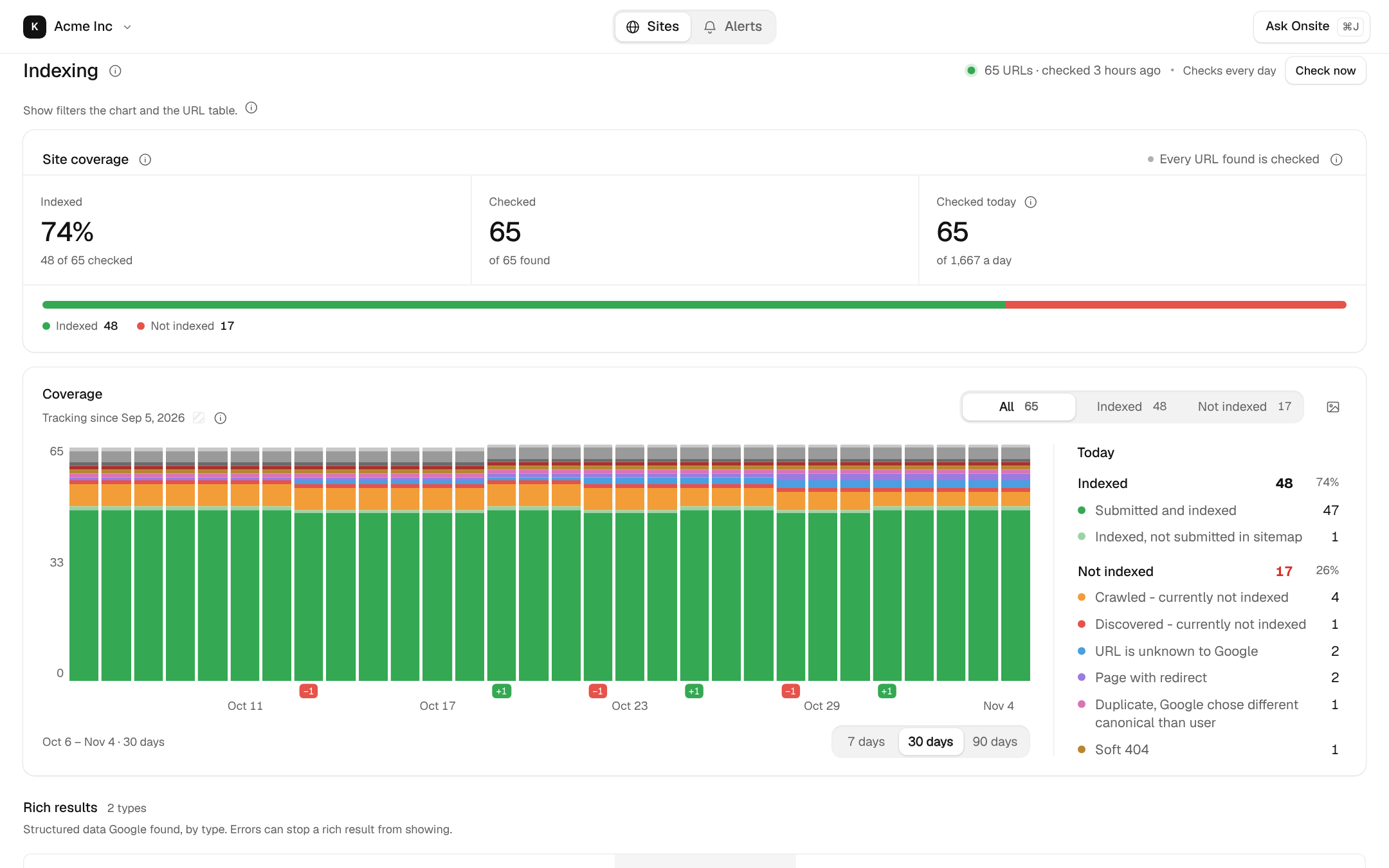
Section titled “What’s on the page”The header shows how many URLs the site has and when they were last checked. Onsite Checks every day on its own, and checks each URL again three days after its last check.
| Part | What it shows |
|---|---|
| Site coverage | The share of checked URLs that are Indexed, how many URLs are Checked out of those found, and how many were Checked today out of the site’s daily allowance. |
| Coverage | Indexed and not indexed URLs day by day, over 7 days, 30 days or 90 days, with the reason Google gave for each. |
| Rich results | The structured data Google found, by type, with how many pages are valid, have warnings or have errors. |
| URLs | Every URL, one by one, with its clicks, impressions, coverage status, rich results, last crawl and when Onsite checked it. |
Show at the top picks All, Indexed or Not indexed, and filters both the chart and the URL table.
Check a site now
Section titled “Check a site now”Choose Check now to run a check straight away instead of waiting for the next one. It uses credits, and it’s charged once however often you press it. The header shows Check queued until it starts, then how far it’s got.
Find the URLs that need you
Section titled “Find the URLs that need you”In URLs, choose Add filter to narrow the list:
- Coverage status, like Crawled - currently not indexed.
- Page type, from your page types.
- Rich result type and Rich result status: valid, with warnings, with errors or no rich results.
- Last crawl: never crawled, the last 7 days, or not crawled for 90 days or more.
- In sitemap: yes or no.
- Search traffic: with clicks, no clicks, or impressions but no clicks.
Search matches URLs, status and rich results; separate alternatives with commas. Export sends the list to CSV, Excel or Google Sheets, with each URL’s canonical and sitemap details.
Inspect one URL
Section titled “Inspect one URL”Select a URL to see everything Google says about it:
- Verdict: URL is on Google, URL is on Google, but has issues, or URL is not on Google.
- Indexing allowed, robots.txt and Page fetch: whether a noindex tag, robots.txt or a fetch error is keeping it out.
- Google’s canonical and Your canonical: when they differ, Google picked another page as the main version.
- In a sitemap, Page type and Last crawl.
- First seen, Indexed since and Time to index.
- Status changes: each time its status changed.
Once you’ve fixed a page, choose Request indexing in Search Console. It opens Search Console in a new tab, where you press Request indexing. The sheet then shows when Google crawled it again and whether it’s on Google.
What the statuses mean
Section titled “What the statuses mean”These are Google’s own words, so they match what you see in Search Console.
| Status | What it means |
|---|---|
| Submitted and indexed | The page is in Google and can show in results. |
| Crawled - currently not indexed | Google visited the page and chose not to index it for now. Often it’s thin, a near copy of another page, or not linked to much. |
| Discovered - currently not indexed | Google knows the URL but hasn’t visited it yet. |
| Page with redirect | The URL redirects somewhere else, so the target is indexed instead. |
| Duplicate, Google chose different canonical than user | Google thinks another page is the main version. |
| Excluded by ‘noindex’ tag | The page asks not to be indexed. |
| Not found (404) | The page doesn’t exist. |
If something looks wrong
Section titled “If something looks wrong”Striped bars on the Coverage chart
No checks were recorded for those dates, usually because tracking hadn’t started. It doesn’t mean your pages were out of Google.
The totals keep growing
Totals grow as Onsite checks more of your URLs, not only when Google’s index changes. Once every URL found is checked, the line settles.
A URL I know about isn't in the list
Onsite finds URLs by reading your sitemaps. Add the page to a sitemap, and it’s picked up at the next check.
It says Not included in your plan
Your plan doesn’t include indexing checks. See Billing and credits.